
Living here
Install La Petite Nation as an app on your phone or computer
No app store needed. A few taps put the crest on your home screen, and the pages you've already read stay there even when the cell signal doesn't.
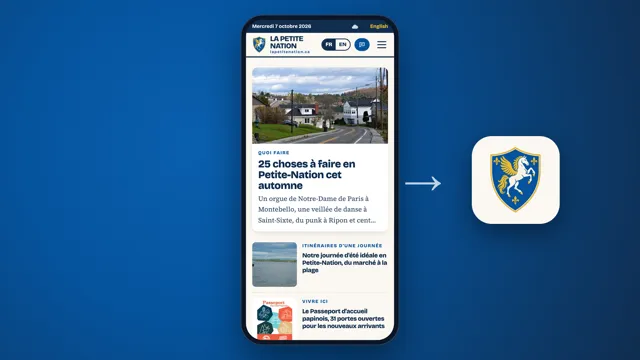
You can install this site like an app. No app store, no account, nothing to pay. You add it from your browser, the crest shows up on your home screen or in your Dock, and the site opens in its own window without the address bar.
Handy if your cottage sits at the end of a gravel road where the signal gives up: pages you've already opened stay readable offline.
iPhone and iPad
In Safari
- Open lapetitenation.ca in Safari.
- On iPhone, tap the Page Menu button (the three dots), then Share. Depending on your tab layout, the Share button (the square with an arrow pointing up) may sit right in the toolbar. On iPad, tap the Share button, then View More.
- Scroll down and tap Add to Home Screen. If it isn't there, scroll to the bottom, tap Edit Actions and add it.
- Leave Open as Web App turned on.
- Tap Add.
In Chrome
- Open the site in Chrome.
- Tap the Share button on the right of the address bar.
- Tap Add to Home Screen, check the name, then tap Add.
Android
In Chrome
- Open the site in Chrome.
- Tap More (the three dots) on the right of the address bar.
- Tap Install and create shortcut, then Install.
In Samsung Internet
- Open the site in Samsung Internet.
- Tap the menu (the three lines, bottom right).
- Tap Add page to, choose Home screen, and confirm.
In Firefox
- Open the site in Firefox.
- Tap the menu (the three dots).
- Tap Add to Home screen, then confirm.
Mac
In Safari (macOS Sonoma 14 or later)
- Open the site in Safari.
- From the menu bar, choose File > Add to Dock. You can also click the Share button and pick Add to Dock.
- Keep the name or change it, then click Add.
The app is saved in the Applications folder inside your home folder, and you can open it from the Dock or Spotlight.
In Chrome or Edge
Same steps as on Windows, right below.
Windows PC
In Edge
- Open the site in Edge. Since it's a web app, Edge will often offer to install it, with an icon in the address bar.
- If not, open Settings and more (the three dots), then More tools > Apps > Install this site as an app.
- To pin it, go to edge://apps, click Details under La Petite Nation, then Pin to taskbar.
In Chrome
- Open the site in Chrome.
- Click More (the three dots, top right), then Cast, save, and share > Install page as app. Sometimes an Install icon shows up right in the address bar.
- Follow the prompts.
Firefox on a computer
On a Mac, Firefox doesn't install sites as apps. Bookmark it (Cmd+D) and you're set. On Windows, recent versions of Firefox show an Add tab to taskbar button in the address bar. If you don't see it, a bookmark (Ctrl+D) does the job.
Removing it
- iPhone and iPad: touch and hold the icon and choose to delete it.
- Android with Chrome: Settings > Apps > See all apps, tap La Petite Nation, then Uninstall.
- Mac with Safari: in the Finder, choose Go > Home, open the Applications folder and drag the app to the Trash.
- Chrome on a computer: open the app, click More (the three dots), then Uninstall La Petite Nation > Remove.
- Edge: go to edge://apps, click Details under the app, then Uninstall.
What the app does, and what it doesn't
- No account. Nothing to sign up for.
- No cookies. It's the same site with the same privacy policy: no tracking or advertising cookies.
- No notifications. The app won't ask for them and won't send any.
- Offline, partly. Pages you've already opened stay readable without a connection. A page you've never visited takes you back to the home page. Weather and maps still need a signal.
- It updates itself. Whenever you're online, the app grabs the latest version of each page. Nothing to download, ever.
Heading up to the cottage? Open the calendar and the listings you care about while you still have signal in the village. They'll be waiting at the end of the road.
Sources: Apple, iPhone, Apple, iPad, Apple, Mac, Apple, deleting apps, Google Chrome, Microsoft Edge, Mozilla Firefox (Windows), Mozilla Firefox (Android), Samsung Internet.
Read next
The Passeport d'accueil papinois, a welcome kit for newcomers to Papineau
Moved to the MRC in the last year? A free booklet gets you 31 discounts or freebies from local businesses, plus $15 in Petite-monnaie. Only 100 printed.

Lake associations, the volunteers keeping our water clear
Kayak sentinels on Lac Gagnon, water samples on Lac des Plages, an old guard on Viceroy since 1973. Who watches over our lakes, and how cottagers can pitch in.

La Petite-monnaie, the local money that stays in Papineau
$100 gets you 105 Petites-monnaies, and the Ripon café takes them like dollars. How our local currency works, where to buy it and where to spend it.